Recently when I used VMware Update Manager to patch a newly rebuilt vSphere 4.1, it couldn’t boot up when it was rebooting. Using DRAC to login into its console and found this error.

I did a search and found this in VMware forum communities. VMware KB1004574 kind of mentioned the reason behind this: /boot/partition ran out of space. My /boot/ at that time had 16 MB, and during patching it needs at least 24MB to boot properly, which is the size of the new initrd-2.6.18-xxx.ESX.img. When space is less than 24MB, the new initrd-2.6.18-xxx.ESX.img file (in my case, it was initrd-2.6.18-274.ESX.img) can’t be created, which causes initrd has a broken link to a non-existing file.
If you are able to login into Troubleshooting Mode, it would be an easy fix. In /boot, with command ls -l,
you will able to see the red broken link. All you need to do is relink
it to a valid existed initrd-2.6.18-xxx.ESX.img by using ln -sf initrd-2.6.18-238.ESX.img.
Reboot the server now and it should come back up. However, in my case
when I try to enter into Troubleshooting mode, it ran into an infinite
loop of signature mismatch error. 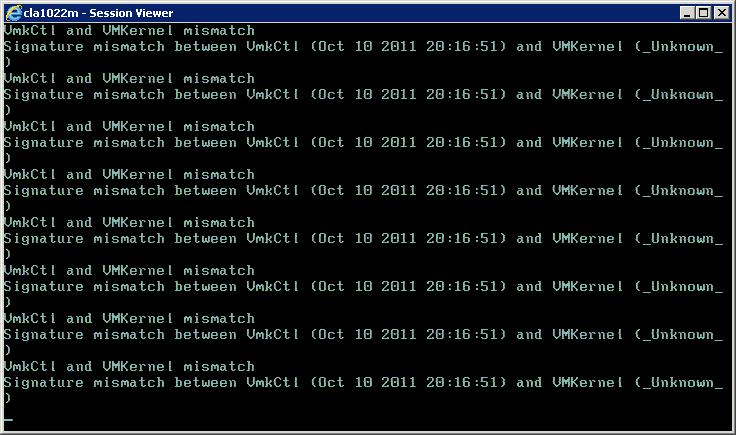
Then I found this VMware KB1007908, and I chose the second option for me, which worked perfectly well. It uses a live CD to boot the server into Linux, and fixes the host’s grub.conf from a chroot environment to point to a valid img file. The main concept here is to have initrd file linked to a valid img file to make the host bootable. After the host is able to boot up, we will have to clean up the /boot/ partition, and run esxcfg-boot -b to fix the normal boot image and esxcfg-boot -t to fix the troubleshooting mode image. Here are the command I used when I boot into the live CD:
fdisk -l | more
mkdir /mnt/esx
mount /dev/sda2 /mnt/esx
mount /dev/sda1 /mnt/esx/boot
mount /dev/sda5 /mnt/esx/var/log
chroot /mnt/esx
bash
ln -sf initrd-2.6.18-238.ESX.img initrd.img
After the host booted up, I ran the following commands.
mv /boot/initrd-2.6.18-194.ESX.img /tmp/
esxcfg-boot -b #this will create initrd-2.6.18-274.ESX.img
ln -sf initrd-2.6.18-274.ESX.img initrd.img
mv /boot/initrd-2.6.18-238.ESX.img /tmp/
Now, everything is back to normal.


No comments:
Post a Comment